
Give a customer a receipt for a rebate
Manufacturer rebates usually ask for a receipt that shows the item, its serial number, the date of purchase and proof of payment. Print Invoice on the order page gives you all of it.
- Open the order and click Print Invoice.
- When the order is paid in full, the page is titled RECEIPT. It shows the order date, the customer under Bill To, the FFL dealer the gun went to under Ship To (name, FFL number and address), each item with its SKU and price, the serial number under each gun (S/N), and a Payment section with the payment date, the card type and last four digits, the amount and the authorization code, plus Paid in full.
- Print it, or choose Save as PDF in the print window and email the PDF to the customer.
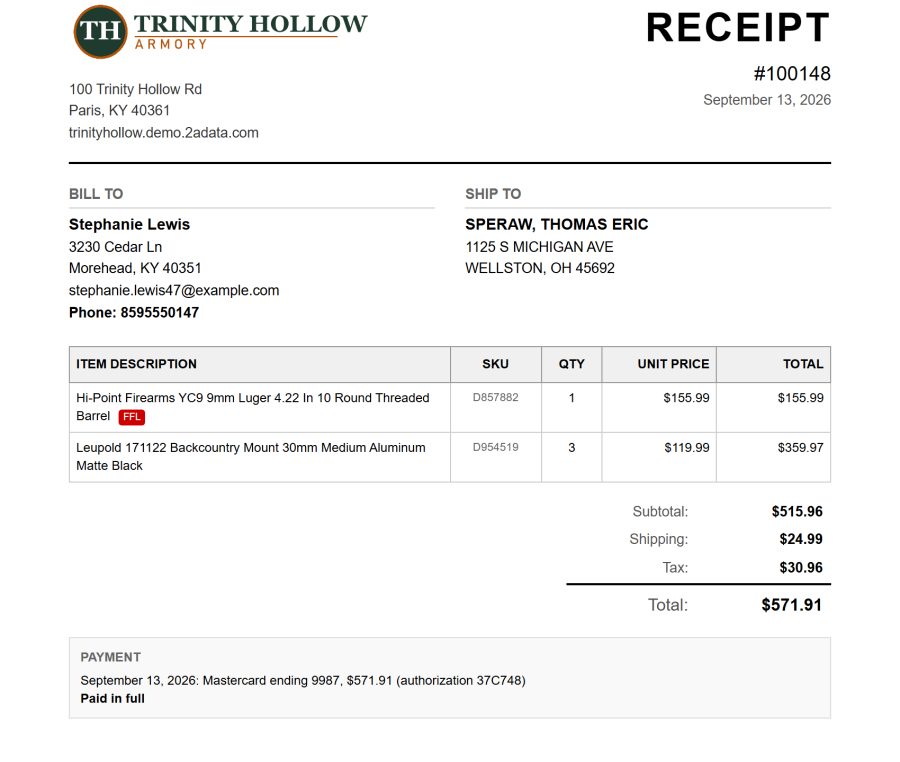
An order that is not paid in full prints as an INVOICE, with the payments taken so far and the Balance due. An order with no recorded payment, such as a GunBroker order paid on GunBroker, prints as an invoice without a Payment section.
Note: The serial number prints once it is entered on the order. If S/N is missing, add the serial on the order first, then print.
Still stuck? Email support@2adata.com and tell us which article you were reading.
Comments
No comments yet. Questions and tips from other store owners are welcome.
Leave a comment